
Skip to product information


Lightroom presetSensor Archive
Lightroom Presets (CCD 2004, MiniDV 2003, Phone 2007)
The digicam, camcorder and flip-phone look for your photos. 6 presets for Lightroom Classic and mobile.
€24,99
Taxes included.
Buy 2 looks, save 15%. Buy 3 or more, save 25%. Applied automatically at checkout.
- Format
- .xmp preset
- Works with
- Lightroom · Lightroom Classic · Camera Raw
- Strength
- Amount slider, subtle to full
- For video
- Also available as a LUT for log footage
- Delivery
- Instant download
Made by Thijs Kern, senior colorist. Graded for Nike, McDonald's, Mastercard and others.
Digital product, downloaded right after checkout. If something does not work, help is one message away.
Overview
Three camera eras for photographers: CCD 2004, MiniDV 2003 and Phone 2007, as Lightroom presets.
Point, shoot, remember.
Three camera eras for your photos: the mid-2000s CCD digicam, the early-2000s MiniDV camcorder and the 2007 flip phone. Built from the same looks as the OW Sensor Archive LUTs, now as Lightroom presets for Lightroom Classic and Lightroom on your phone. For everyone who wants their photos to feel like a memory, not like content.
What is inside
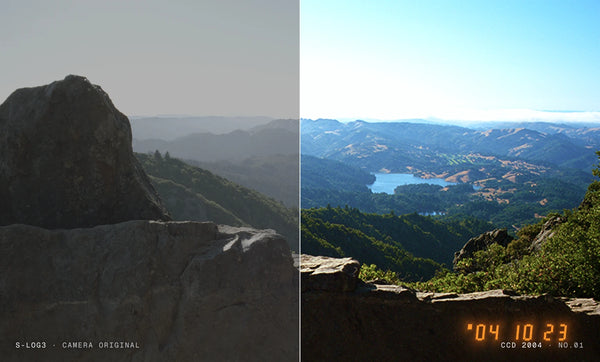
- CCD 2004: hard digital highlight clip, deep blacks, deep blue skies, punchy reds and yellow-green foliage.
- MiniDV 2003: milky blacks, bright and flat midtones, cool video colour and hot magenta-leaning reds.
- Phone 2007: muddy shadows, a yellow-green cast, faded colour, olive greens and highlights that blow out early.
Each look comes in two versions. Colour applies the look only. Camera adds the texture of that camera: crunchy sharpening, soft detail, noise, grain and vignette.
Why it looks real
Most "Y2K" presets push a few sliders. These presets carry the full colour of the OW Sensor Archive inside a creative profile, the same type of profile as Adobe's own Vintage and Artistic profiles. The tone curve, the clip and every colour shift are identical to the LUTs colourists use on video, so photo and film can share one look.
How to use it
- Import. Lightroom Classic: Develop › Presets › + › Import Presets. Lightroom on your phone: open a photo › Presets › ⋯ › Import presets, and pick the mobile zip.
- Expose first. Set exposure and white balance. Let bright skies and lamps burn: the clip is part of the look.
- Apply and dial. Choose Colour or Camera, then use the Amount slider to go from subtle to full.
Best suited for
- Party, night-out and flash photos.
- Holidays, road trips and everyday snapshots that should feel like a found memory.
- Fashion, portrait and street photography with a Y2K feel.
- Photos straight from your phone, as well as raw files from any camera.
Shooting video too? The same looks are available as LUTs and DCTLs, with date stamps, REC overlays and low-resolution effects that Lightroom cannot do.
Sample images: OpenEXR test images, © Industrial Light & Magic. Not affiliated with or endorsed by any camera or phone manufacturer.
Specifications
What you get, and where it works.
Included
Compatibility
Next step
The same looks, for the film.
Every look in this pack has a LUT twin for video. Photo and film end up in one colour. Add both and save 15%.
 This look
Lightroom Presets (CCD 2004, MiniDV 2003, Phone 2007)
Together
Or pair it with


Reviews
No reviews for this one yet. Across the store, 4.8 out of 5 from 21 verified reviews.
Every tool here is built the same way, by the same colorist. Read the reviews of Nostalgic Film
More from Offwhitecolor
All Lightroom Presets


Brand, camera and film-stock names are trademarks of their owners, used only to describe what a tool models or accepts. Offwhitecolor is not affiliated with them.