
Skip to product information


LUTSensor ArchiveNo. 03
Phone 2007 LUT
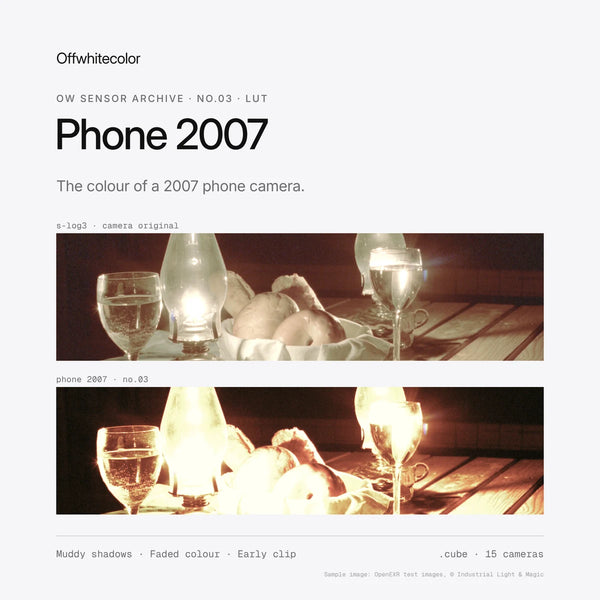
The colour of a 2005-2008 phone camera: muddy shadows, a yellow-green cast and faded colour. 15 camera profiles in one download.
€19,99
Taxes included.
Buy 2 looks, save 15%. Buy 3 or more, save 25%. Applied automatically at checkout.
- Format
- .cube
- Works with
- Resolve · Premiere Pro · Final Cut Pro
- Delivery
- Instant download
Made by Thijs Kern, senior colorist. Graded for Nike, McDonald's, Mastercard and others.
Digital product, downloaded right after checkout. If something does not work, help is one message away.
Overview
2005-2008 phone camera colour: muddy shadows, a yellow-green cast, faded colour and an early clip.
Low battery, high memory.
The colour of a 2005-2008 mobile phone camera, rebuilt for modern footage. Muddy shadows, a yellow-green cast, faded colour, olive greens, washed-out skies and highlights that blow out early. The look of the first camera that was always in your pocket, made with the precision of a cinema grade.
What you will notice
- A steep, low-dynamic-range tone curve with muddy, crushed shadows.
- Highlights that clip early, under three stops above mid-grey.
- A yellow-green cast through the midtones and warm, yellowish highlights.
- Faded, uneven colour: greens slide to olive, blue skies wash out to a pale grey-blue, reds turn orange.
- Skin kept recognisable inside the cheap-sensor palette.
How to use it
- Find the folder for your camera. Fifteen input profiles are included in one download, from Sony S-Log3 and ARRI LogC to Apple Log and Rec.709.
- Balance first. Set exposure and white balance on the log footage. Exposure matters: the clip is part of the look.
- Apply Phone 2007 as the look stage, then set its strength with your software's LUT intensity or node opacity. For the full effect, edit in a 4:3 frame.
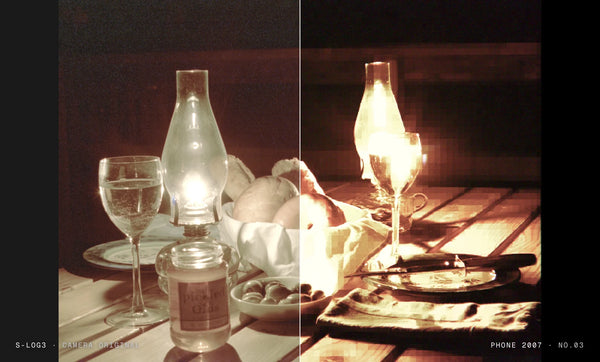
Want the low-resolution pixels, JPEG blocks, sharpening, lens shading and chromatic aberration as well? They are in the Phone 2007 DCTL for DaVinci Resolve Studio.
How it was developed
Phone 2007 is built on how early camera phones made a picture: a tiny sensor with little dynamic range, a fixed-focus plastic lens, a cheap colour matrix and auto white balance that drifted towards green and yellow, all saved as a small, heavily compressed JPEG. The result is an original look that reproduces those characteristics on modern log footage, working on scene-linear light after a published-specification input transform for each camera.
Best suited for
- Music videos, fashion and social content with a low-res, 2000s feel.
- Night-out, party and backstage footage that should feel like it was shot on a flip phone.
- Memory and flashback scenes in short films.
- Indoor, mixed and low light, where early phones struggled most.
Sample images: OpenEXR test images, © Industrial Light & Magic.
Specifications
What you get, and where it works.
Included
Compatibility
Next step
Complete the look
Add the Phone 2007 DCTL for low-res pixels, JPEG blocks and lens shading. Buy 2 looks, save 15% at checkout.
Or pair it with


Reviews
No reviews for this one yet. Across the store, 4.8 out of 5 from 21 verified reviews.
Every tool here is built the same way, by the same colorist. Read the reviews of Nostalgic Film
More from Offwhitecolor
Apple Log LUTs for iPhone


Brand, camera and film-stock names are trademarks of their owners, used only to describe what a tool models or accepts. Offwhitecolor is not affiliated with them.