
Skip to product information


DCTLSensor ArchiveNo. 02
MiniDV 2003 DCTL
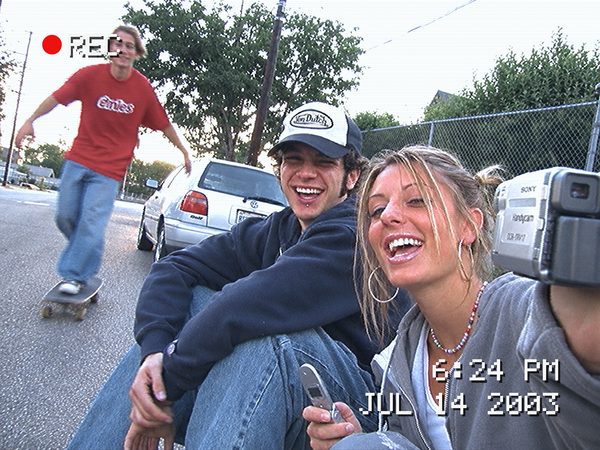
Early-2000s camcorder colour plus the camcorder itself: edge enhancement, colour bleed, interlace and a REC and date overlay, in one Resolve node.
€29,99
Taxes included.
Buy 2 looks, save 15%. Buy 3 or more, save 25%. Applied automatically at checkout.
- Format
- .dctl
- Works with
- DaVinci Resolve Studio
- Delivery
- Instant download
Made by Thijs Kern, senior colorist. Graded for Nike, McDonald's, Mastercard and others.
Digital product, downloaded right after checkout. If something does not work, help is one message away.
Overview
Early-2000s MiniDV camcorder colour: bright, cool video, milky blacks, hot reds and a hard video clip.
Press record, 2003.
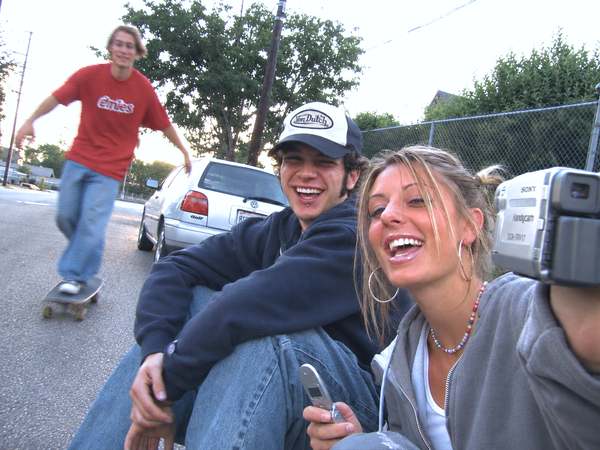
The colour of an early-2000s MiniDV camcorder, rebuilt for modern footage, together with the camcorder itself. Bright, cool video colour, milky blacks, hot reds and the hard highlight clip of a small three-chip or single-chip video camera. The home-video look of birthday parties, skate clips and holidays, made with the precision of a cinema grade.
What you will notice
- A bright, flat video tone curve with lifted, milky blacks.
- A hard video highlight clip about three stops above mid-grey: skies and windows burn to white.
- A cool, slightly blue cast through the shadows and midtones, like auto white balance on daylight video.
- Hot, saturated reds leaning towards magenta, the colour that bleeds on every DV tape.
- Foliage turned cooler and cyan-green, yellows slightly quieter, blues gathered into one clean video blue.
The camcorder, not just the colour
- Input Profile: built-in transforms for 15 inputs, from Sony S-Log3 and ARRI LogC to Apple Log, DaVinci Intermediate and Rec.709.
- SD Softness: the soft detail of a 480-line standard-definition picture.
- Edge Enhancement: the bright halos of a camcorder's detail circuit.
- Colour Bleed: DV's 4:1:1 colour, smearing sideways past edges.
- Video Noise: fine luma noise and horizontally coarse chroma noise, moving with your footage.
- Interlace: alternate lines shifted and darkened, like interlaced video.
- 4:3 Frame: side bars for a 4:3 picture inside a 16:9 timeline.
- REC and Date/Time overlay: the red REC dot and the white pixel-font time and date, set to any moment you like.
- Look Strength, Exposure, Saturation, White Balance and Highlight Clip to tune the colour.
How to use it
- Select your input. Apply the DCTL to your log footage and choose its profile under Input Profile. In a colour-managed DaVinci Wide Gamut project, choose DaVinci Intermediate.
- Balance first. Set exposure and white balance before the DCTL.
- Apply MiniDV 2003, set the Look Strength, then add as much texture and overlay as the shot needs. The DCTL outputs Rec.709 Gamma 2.4.
How it was developed
MiniDV 2003 is built on how DV camcorders recorded an image: a video gamma curve with a knee and a hard clip, consumer auto white balance, and the DV format's 720 × 480 or 720 × 576 frame with colour stored at a quarter (NTSC, 4:1:1) or half (PAL, 4:2:0) of the luma resolution. The result is an original look that reproduces those characteristics on modern log footage, working on scene-linear light after a published-specification input transform for each camera.
Best suited for
- Music videos, skate and fashion edits with a Y2K home-video feel.
- Party, festival and holiday footage that should feel like a found tape.
- Behind-the-scenes and documentary inserts that need a different texture.
- Handheld footage in daylight or harsh on-camera light.
Requires DaVinci Resolve Studio. Sample images: OpenEXR test images, © Industrial Light & Magic.
Specifications
What you get, and where it works.
Included
Compatibility
Release notes
Version 1.0 — Initial release
Next step
Build your Resolve toolkit
Pair the DCTL with the MiniDV 2003 LUT for Premiere, Final Cut and on-set monitoring. Buy 2, save 15% at checkout.
 This look
MiniDV 2003 DCTL
Together
Or pair it with


Reviews
No reviews for this one yet. Across the store, 4.8 out of 5 from 21 verified reviews.
Every tool here is built the same way, by the same colorist. Read the reviews of Nostalgic Film
More from Offwhitecolor
Apple Log LUTs for iPhone


Brand, camera and film-stock names are trademarks of their owners, used only to describe what a tool models or accepts. Offwhitecolor is not affiliated with them.