
LUTCinema LooksNo. 09
Atelier LUT
Look study · 2.39 : 1The devil is in the details · creamy highlights · olive greens
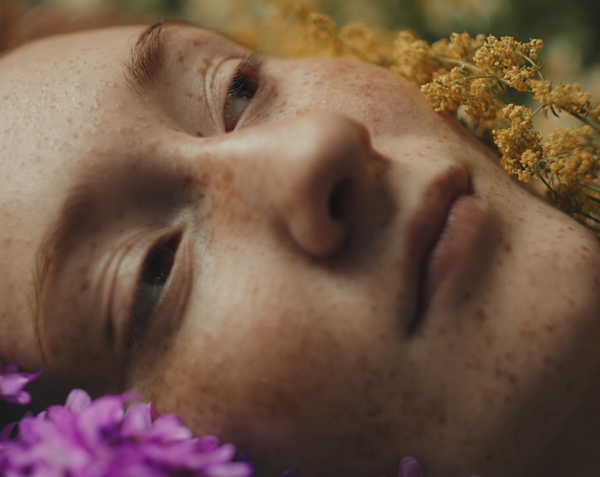
Inspired by The Devil Wears Prada 2: creamy highlights, soft contrast, olive greens and natural skin. 15 camera profiles in one download.
€19,99
Taxes included.
Buy 2 looks, save 15%. Buy 3 or more, save 25%. Applied automatically at checkout.
- Format
- .cube
- Works with
- Resolve · Premiere Pro · Final Cut Pro
- Delivery
- Instant download
Made by Thijs Kern, senior colorist. Graded for Nike, McDonald's, Mastercard and others.
Digital product, downloaded right after checkout. If something does not work, help is one message away.
Overview
Soft editorial daylight with creamy highlights, olive greens and natural skin.
The devil is in the details.
An editorial daylight look inspired by the colour world of The Devil Wears Prada 2. Soft contrast, creamy highlights and a quiet, considered palette, with natural skin and rich darks. The look of a fashion house on film: calm, warm and expensive, never loud. Designed as a finished look for your own log footage.
What you will notice
- Creamy, warm highlights with a long, soft roll-off, so bright windows and white walls never turn harsh.
- Gentle contrast with deep blacks and a subtle cool tint in the darkest shadows.
- Greens and foliage turned towards olive and muted, so backgrounds stay calm.
- Natural skin, held slightly warm and away from red.
- Camel, leather, burgundy and navy kept rich; bright primaries quietened.
- Overall saturation slightly reduced for a restrained, editorial palette.
How to use it
- Find the folder for your camera. Fifteen input profiles are included in one download, from Sony S-Log3 and ARRI LogC to Apple Log and Rec.709.
- Balance first. Set exposure and white balance on the log footage.
- Apply Atelier as the look stage, then set its strength with your software's LUT intensity or node opacity.
How it was developed
Atelier was built by measuring the tone curve, colour per brightness range, skin and saturation of reference frames from The Devil Wears Prada 2, then designing an original look that matches those characteristics. It works on scene-linear light after a published-specification input transform for each camera, with smooth hue transitions so skin and gradients stay clean.
Best suited for
- Fashion, beauty and editorial work.
- Daylight interiors, offices, apartments and hotels.
- City streets in daylight and overcast exteriors.
- Interviews, brand films and lifestyle content.
Atelier is an original look by OFFWHITECOLOR. It is not affiliated with or endorsed by the film or its studio.
Specifications
What you get, and where it works.
Included
Compatibility
Next step
Build your cinema look set
Pressed Flowers takes the same softness somewhere warmer. Add any look and save 15% on both, applied automatically at checkout.
Or pair it with


Reviews
No reviews for this one yet. Across the store, 4.8 out of 5 from 21 verified reviews.
Every tool here is built the same way, by the same colorist. Read the reviews of Nostalgic Film
More from Offwhitecolor
Apple Log LUTs for iPhone


Brand, camera and film-stock names are trademarks of their owners, used only to describe what a tool models or accepts. Offwhitecolor is not affiliated with them.